Best AOSEED 3D Printer for Kids: X-Maker vs X-Maker Joy (2026)
Best AOSEED 3D Printer for Kids: X-Maker vs X-Maker Joy (2026)
If you’re shopping for a kid-friendly 3D printer, AOSEED’s X-Maker and X-Maker Joy probably landed in your cart together – and now you’re stuck trying to figure out which one is the right starter machine for your child.
AOSEED has carved out a niche with printers built for beginners and young creators, focusing on safety and simplified workflows. Both models promise to make 3D printing accessible, but they take slightly different paths to get there.
We’ll break this down head-to-head across the decision axes that actually matter for a kids’ printer: setup complexity, app experience, print quality and speed, safety features, and the creative library. By the end, you’ll know exactly which model fits your child’s first foray into 3D printing.
Best AOSEED 3D Printer for Kids: X-Maker vs X-Maker Joy (2026)
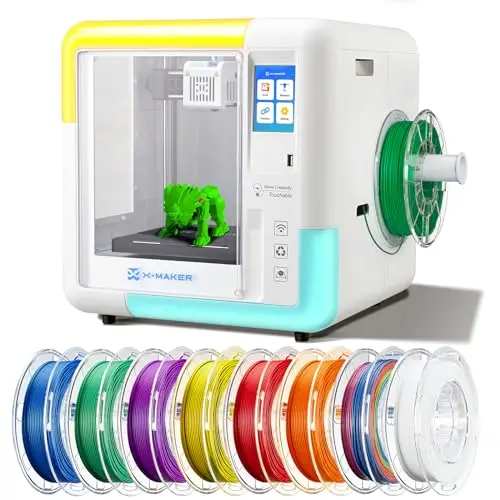
X-Maker – Fully Assembled & Ready to Print
The AOSEED X-Maker is the ‘plug-and-play’ pick, arriving fully assembled so kids can start printing almost immediately. Its enclosed design and leveling-free bed prioritize safety and simplicity.
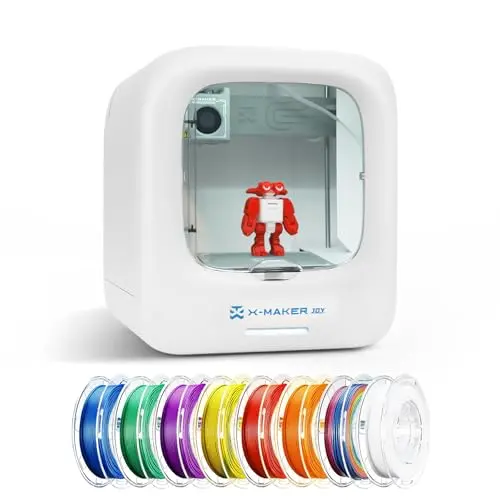
X-Maker Joy – High-Precision with Vast Library
The AOSEED X-Maker Joy steps up the creative potential with a massive design library and higher precision. Its built-in camera and faster print speed cater to kids ready to dive deeper into 3D design.
How We Evaluated AOSEED X-Maker and X-Maker Joy
We didn’t run a multi-week classroom trial printing hundreds of toys. What we did: triangulated AOSEED’s published specifications, aggregated owner feedback where available, and mapped each printer’s features against the core needs of young, first-time users. We placed the AOSEED X-Maker and X-Maker Joy side-by-side across six evaluation dimensions: ease of setup, app and software experience, print quality and speed, safety design, creative library size, and overall value for a beginner.
Our analysis surfaced the deltas between the two models. They aligned on three fundamentals – both are enclosed for safety, offer wireless connectivity, and require no manual bed leveling. They diverged on three decision-critical axes: the depth of the design library, the presence of a monitoring camera, and their approach to out-of-box readiness. Our goal isn’t to crown one ‘best’ but to clearly show which printer’s strengths match your child’s interests and your need for simplicity.
AOSEED X-Maker vs X-Maker Joy: Which One Should You Buy?
1. AOSEED Kids' 3D Printer Showdown: X-Maker vs X-Maker Joy
To see where these two models stand apart, here’s a direct comparison of their key specifications and features.
| Dimension | AOSEED X-Maker | AOSEED X-Maker Joy |
|---|---|---|
| Print Accuracy | 0.1 / 0.05 mm | 0.05 mm |
| Print Speed | 160 mm/s | 200 mm/s |
| Design Library | 15 mini-app models | Over 1,500 designs + weekly updates |
| Weight | 32 lbs | 14.3 lbs |
| Key App Feature | Basic control & printing | Real-time camera monitoring & time-lapse |
| Safety & Setup | Enclosed, fully assembled, no leveling | Enclosed, no leveling, quick-release nozzle |
The table highlights the core trade-off: the X-Maker prioritizes ultimate simplicity, while the X-Maker Joy offers greater creative depth and higher technical specs.
2. Who Should Choose the AOSEED X-Maker?
Choose the AOSEED X-Maker if your top priority is a hassle-free start. This is the printer for parents who want to minimize setup time and for younger kids (or total beginners) who might be overwhelmed by too many options.
It’s also a strong fit if you value physical safety and simplicity above all else – the enclosed design and pre-assembled state mean less to go wrong. If your child’s interest is casual and you just want them to experience 3D printing without a deep dive into customization, the X-Maker’s straightforward approach is perfect.
3. Who Should Choose the AOSEED X-Maker Joy?
Go with the AOSEED X-Maker Joy if your child is digitally savvy and craves creative options. The vast, updated design library turns the printer into a endless source of projects, which is ideal for maintaining engagement over time.
It’s also the better choice if you want higher print quality and speed for more detailed creations, or if remote monitoring via the built-in camera gives you peace of mind. For kids interested in STEM learning or who have already shown an aptitude for tech, the X-Maker Joy’s expanded feature set will feel more rewarding.
4. Where the X-Maker and X-Maker Joy Overlap
It’s important to note that both printers share a strong foundation. They are both fully enclosed for safety, use PLA filament (and come with a starter set), require no manual bed leveling, and offer Wi-Fi connectivity for wireless printing. For basic printing tasks in a safe, beginner-friendly environment, either model will do the job well.
Frequently Asked Questions
1. What's the main difference between the AOSEED X-Maker and X-Maker Joy?
The core difference is the creative scope and technical edge. The X-Maker Joy has a much larger design library (1,500+ vs. 15 models), a built-in camera for monitoring, slightly higher print precision (0.05 mm vs. 0.1/0.05 mm), and faster print speed. The X-Maker focuses on simplicity by arriving fully assembled.
2. Which AOSEED 3D printer is easier for a young child to use?
The X-Maker has a slight edge in pure ease-of-use because it’s fully assembled and has a simpler app interface. For a very young child or a first-time user where adult supervision is high, its straightforward ‘press print’ approach can be less intimidating.
3. Can both printers use the same filaments?
Yes. Both the X-Maker and X-Maker Joy are designed to use standard 1.75 mm PLA filament, which is the safest and most common type for beginner 3D printers. They each come with an 8-color starter set.
4. Is the app better on the X-Maker or X-Maker Joy?
The X-Maker Joy’s app is more feature-rich, with camera monitoring and time-lapse capabilities. However, user reports indicate it can also be less stable at times. The X-Maker’s app is more basic but may be more reliable for simple printing tasks. Your choice depends on whether you value advanced features or rock-solid stability.
5. Which printer is better for making durable toys?
Both printers use PLA, which creates somewhat brittle prints. For durability, it’s more about print settings and design than the printer itself. The X-Maker Joy’s higher precision might allow for slightly more robust interlocking parts, but neither is designed for heavy-duty, industrial-strength toys.
Final Verdict
This isn’t about picking a winner; it’s about matching a printer to your child’s curiosity and your tolerance for tech setup. Choose the AOSEED X-Maker if you want the simplest, safest possible start – a machine that comes ready to run with minimal fuss. Choose the AOSEED X-Maker Joy if your kid is ready to explore a vast world of designs and you value features like remote monitoring and higher print speed. Both are solid gateways into 3D printing for the right young creator.